Getting Started with cURL
Hey buddy how are you ,
What is cURL (in very simple terms)
curl is command-line-tool is used to request and received data to the internet .
curl full name is Client URL .
Think when you open a website in browser then your browser talk to machine to get IP of server on that domain refer his all content . But curl direct talk to your server from your terminal without browser .
Why programmers need cURL
Programmer need cURL primarily to transfer data to an from server through the terminal command .
It is also need to api testing, Network Inspection , automating file transfer etc.
Making your first request using cURL
Hmm let’s see what cURL done means what magic done this cURL .
curl https://example.com

<!doctype html><html lang="en"><head><title>Example Domain</title><meta name="viewport" content="width=device-width, initial-scale=1"><style>body{background:#eee;width:60vw;margin:15vh auto;font-family:system-ui,sans-serif}h1{font-size:1.5em}div{opacity:0.8}a:link,a:visited{color:#348}</style><body><div><h1>Example Domain</h1><p>This domain is for use in documentation examples without needing permission. Avoid use in operations.<p><a href="https://iana.org/domains/example">Learn more</a></div></body></html>
so above command which return html code , means when curl request on example.com then these domain server return html (text) but it may be return json or string .
Understanding request and response
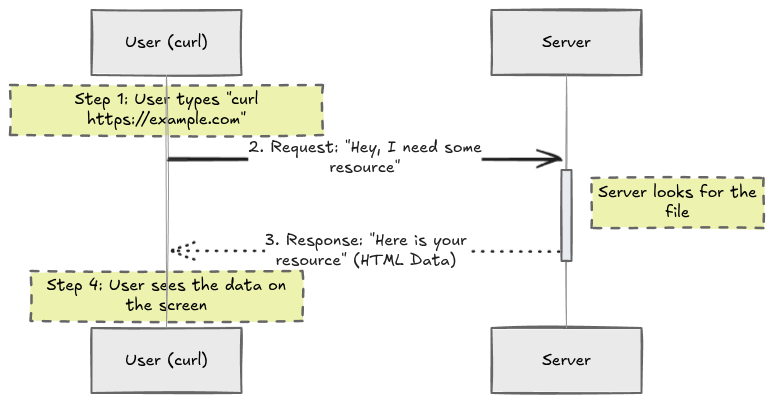
when you run curl command that is called request means you just send request to server (like , hey i need some resource) , when that resource send by the server called response .
Using cURL to talk to APIs
cURL is powerful comand line tool used for transferring data and it is standard to intract with APIs .
Basic structure
curl [options] [url]
Get Request:
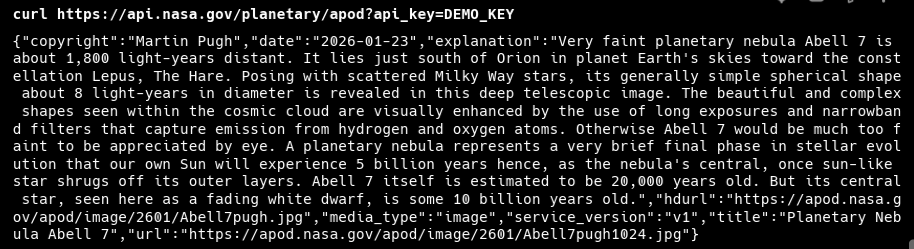
curl https://api.nasa.gov/planetary/apod?api_key=DEMO_KEY
Including Response Headers:
curl -i https://api.nasa.gov/planetary/apod?api_key=DEMO_KEY
curl -i https://api.nasa.gov/planetary/apod?api_key=DEMO_KEY

HTTP/2 200
date: Fri, 23 Jan 2026 17:22:17 GMT
content-type: application/json
content-length: 1190
vary: Accept-Encoding
access-control-allow-origin: *
access-control-expose-headers: X-RateLimit-Limit, X-RateLimit-Remaining
age: 0
strict-transport-security: max-age=31536000; includeSubDomains; preload
vary: Accept-Encoding
via: https/1.1 api-umbrella (ApacheTrafficServer [cMsSf ])
x-api-umbrella-request-id: crtfgctc9mi4us7j0leg
x-cache: MISS
x-content-type-options: nosniff
x-ratelimit-limit: 10
x-ratelimit-remaining: 3
x-vcap-request-id: c55882fe-6ba0-4d3e-7cc0-9d4a95673028
x-frame-options: DENY

{"copyright":"Martin Pugh","date":"2026-01-23","explanation":"Very faint planetary nebula Abell 7 is about 1,800 light-years distant. It lies just south of Orion in planet Earth's skies toward the constellation Lepus, The Hare. Posing with scattered Milky Way stars, its generally simple spherical shape about 8 light-years in diameter is revealed in this deep telescopic image. The beautiful and complex shapes seen within the cosmic cloud are visually enhanced by the use of long exposures and narrowband filters that capture emission from hydrogen and oxygen atoms. Otherwise Abell 7 would be much too faint to be appreciated by eye. A planetary nebula represents a very brief final phase in stellar evolution that our own Sun will experience 5 billion years hence, as the nebula's central, once sun-like star shrugs off its outer layers. Abell 7 itself is estimated to be 20,000 years old. But its central star, seen here as a fading white dwarf, is some 10 billion years old.","hdurl":"https://apod.nasa.gov/apod/image/2601/Abell7pugh.jpg","media_type":"image","service_version":"v1","title":"Planetary Nebula Abell 7","url":"https://apod.nasa.gov/apod/image/2601/Abell7pugh1024.jpg"}
you can see clearly when i request ti api then i got resposne with header, like 200 (successfully received data), content-length etc.
many type of request type exist like POST, PUT, DELETE, PATCH , with this all using you request data from a server .
Common mistakes beginners make with cURL
Many mistakes Beginner have done:
Forget to add protocol before domain
if url has conatining ($, &, ? etc) then enclosed url in quote
mispelling domain name


